Gmail App for Mac: Native, Fast, No Relay | bytemail
Google makes no official Gmail app for Mac. The best Gmail app for Mac is a native client that connects to your Gmail account, such as bytemail. It shows Gmail in a real Mac window with labels and search, and it connects straight to Google with no relay.
If you have ever hunted the App Store for "the Gmail app" and ended up with a stranger's iPad port, you know the feeling. Gmail lives in a browser tab, buried between twenty others, and you wanted it in the Dock where it belongs. Let's break down what exists, what each route costs you, and how bytemail handles Gmail on macOS.
Download bytemail and add your Gmail account in a few minutes. bytemail is built for macOS 14 and later, runs natively on Apple silicon, and is an independent app. It is not an official Google product and Google does not endorse it.
Is there a Gmail app for Mac? Not from Google, but you have three routes
Is there a Gmail app for Mac? Not from Google. Whether you want a Gmail app for macOS, a Gmail app for MacBook or a Gmail desktop client for Mac, you end up choosing between three routes:
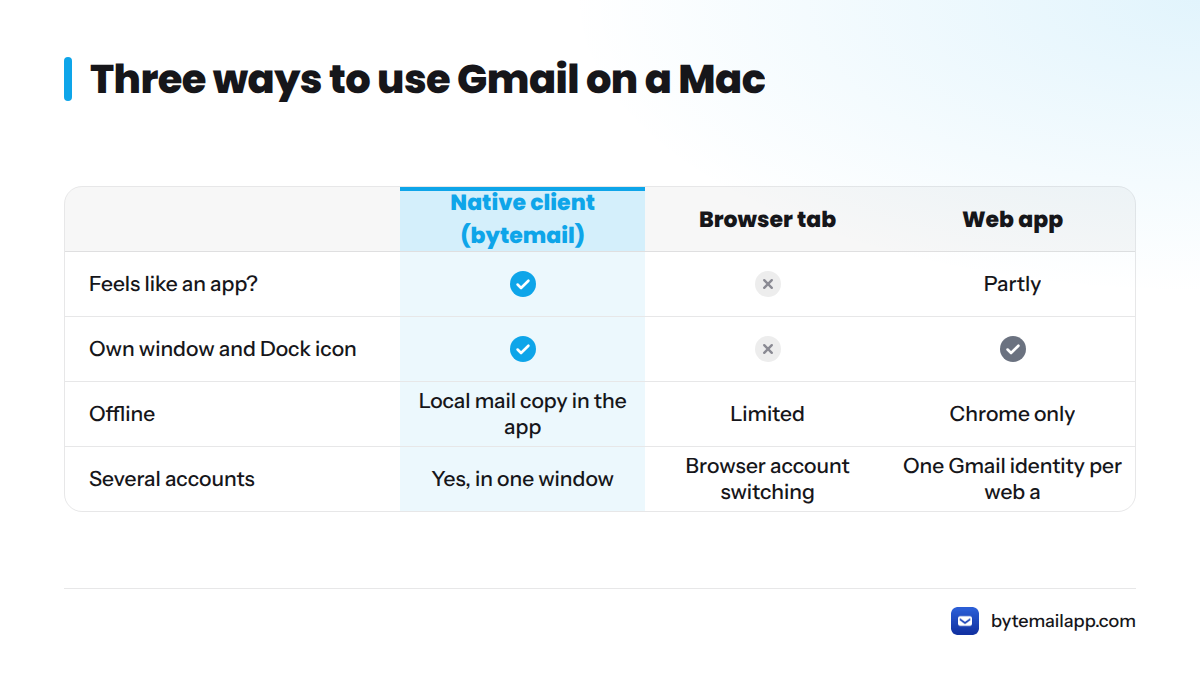
| Route | Feels like an app? | Own window and Dock icon | Offline | Several accounts |
|---|---|---|---|---|
| Gmail in a browser tab | No | No | Limited | Browser account switching |
| Gmail as a web app (Safari Add to Dock, Chrome install) | Partly | Yes | Chrome only | One Gmail identity per web app |
| Native Mac client such as bytemail | Yes | Yes | Local mail copy in the app | Yes, in one window |
The web app route is a shortcut to the same website. Apple documents it in Apple Support's guide to web apps in the Dock, and Google limits Gmail offline mode to Chrome. A native client is a different thing: it is a real application that talks to Google's servers itself.
What is a native Gmail client for macOS? It is a desktop application built with Apple's own frameworks. It opens in its own window, uses macOS notifications, and carries no bundled browser engine. You can read more about what makes bytemail a true native macOS email app.
Why the browser tab and Apple Mail frustrate Gmail users on Mac
I hear the same complaints again and again. Here is why they happen.
The browser tab problem
A Gmail tab competes with every other tab, and closing the browser closes Gmail with it. Browser shortcuts also collide with Gmail's own, a clash we cover in Gmail shortcuts vs Mac shortcuts. Offline access depends on Chrome and its settings, as Google's help page makes clear. If you want a Gmail Mac app without the browser for good, our page on webmail client alternatives for Mac walks through the move.
Where Apple Mail falls short for Gmail users
Apple Mail can connect a Google account, and Apple explains the setup in Add or remove email accounts in Mail. Many Gmail users still find that Gmail's label model sits awkwardly in a folder-style interface. That is a matter of taste, so try it yourself before you decide. For a wider look, see the best email client for Mac compared.
What "native" means day to day
bytemail is written in Swift with SwiftUI and AppKit. You get system fonts, system menus, a Dock badge and standard Mac keyboard behaviour, and no embedded copy of Chromium doing the drawing. Our page on native Apple silicon email covers the hardware side.
How adding Gmail works on Mac with bytemail
bytemail connects to Gmail over standard IMAP and SMTP with a Google app password. Turn on 2-Step Verification in your Google Account, create an app password, and paste it into bytemail. bytemail fills in Google's server settings for you and links straight to the page where you create one. Your main Google password never goes into bytemail.
An app password works only for mail, and you can revoke it from your Google Account whenever you like without changing your main password.
The app password lives in the macOS Keychain, Apple's built-in secure store for credentials. It is not written to a bytemail server. The full walkthrough for adding an account sits in our setup guide, so I will skip the rest of the steps here.
How Gmail labels, archive and search queries behave in bytemail
This is where a Gmail-aware client earns its place on your Dock.
Labels as mailboxes
Gmail labels in a native Mac client show up in the sidebar as mailboxes you can click. A message with two labels appears under both, because in Gmail it is one message wearing two tags. Nested labels keep their hierarchy. We tested this on macOS 14 and later while setting up real Gmail accounts.
Archive and All Mail
Archive in Gmail deletes nothing. It removes the Inbox label, and the message stays searchable in All Mail. bytemail follows the same rule: archive takes a message out of the Inbox, and you still find it in All Mail and under any other labels it carries. Delete is the action that sends mail to Trash.
Gmail search queries in a Mac app
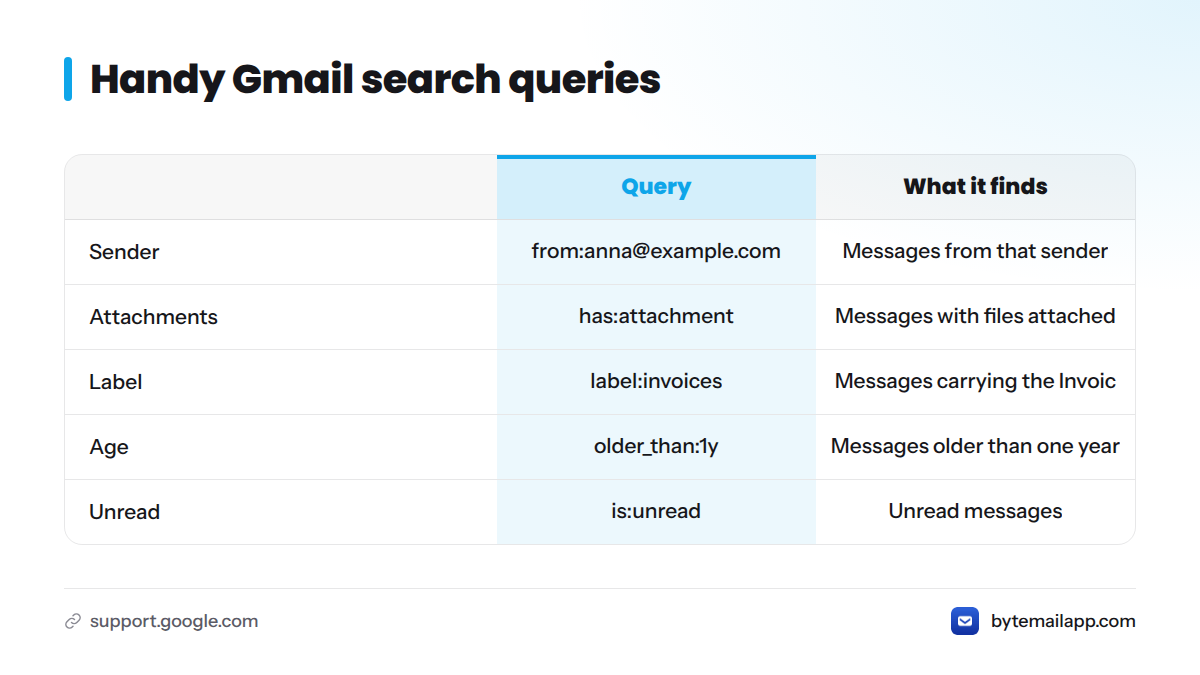
Gmail has its own query language, documented in Google's search operators reference. These are the ones most people reach for:
| Query | What it finds |
|---|---|
from:anna@example.com |
Messages from that sender |
has:attachment |
Messages with files attached |
label:invoices |
Messages carrying the Invoices label |
older_than:1y |
Messages older than one year |
is:unread |
Unread messages |
Support for individual operators can differ between clients, so test your favourite Gmail search queries in the Mac app after you add your account. Our changelog records Gmail-related fixes as they ship.
Where your mail goes: the published network connections
Many Gmail wrappers sit between you and Google. bytemail does not. Mail travels from your Mac to Google and back, with no bytemail relay and no bytemail sync host in the middle.
Picture the data path as a straight line:
- Your Mac (the bytemail app)
- Google's Gmail servers
That is the whole diagram, and you do not have to take my word for it. bytemail publishes the list of network connections the app makes, and the list shows only what the app contacts. The privacy-focused email page explains the model and links to that list. For the legal detail, read the privacy policy.
One note for experts: a client can reach Gmail over standard IMAP or through the Gmail API. The two differ in how labels, threads and push updates surface. bytemail uses IMAP. I limit this page to behaviour I can verify, and I make no security or compliance promises beyond the published connections list.
Speed and native performance on a Mac
I will not quote benchmark numbers, because I would rather show you than claim. What you can expect from a native app is qualitative:
- The window opens like any other Mac app, with no page to load.
- Notifications come through macOS, and the Dock icon carries an unread badge.
- Push-style delivery uses IMAP IDLE, so new mail arrives without a manual refresh.
- It runs on Apple silicon without translation. bytemail needs macOS 14 or later; check the requirements in the FAQ.
Who should use a native Gmail app, and who should stay on Gmail web
A native client does not suit everyone. Here is a quick decision table.
| Your situation | Better fit |
|---|---|
| One Gmail account, you rely on Gmail-only browser add-ons | Gmail web |
| Two or more accounts, one window wanted | Native client |
| You care about where mail travels | Native client with a published connections list |
| You live on the keyboard and want Mac shortcuts | Native client |
| You want mail in the Dock and out of your browser | Native client |
Stay on Gmail web if you use one account, you depend on Google's side panel add-ons, and the browser tab does not bother you. That is a perfectly good setup, and no app is worth switching for if it solves a problem you do not have.
If you do juggle several inboxes, the unified inbox for Mac and our multiple accounts page show how one window handles them. bytemail also works as an email client for Gmail, iCloud and Outlook on Mac.
Next steps: download, add Gmail and test your searches
- Check that your Mac runs macOS 14 or later.
- Download bytemail and choose Gmail.
- Turn on 2-Step Verification, create an app password, paste it in, and watch your labels appear in the sidebar.
- Try your three favourite search queries.
- See bytemail pricing when you are ready to decide.
Guides for adding a Gmail account step by step, using Gmail offline on your Mac, and managing multiple Gmail accounts are on our blog.
Download bytemail and add your Gmail account in a few minutes.
Gmail app for Mac FAQ
Is there a native Gmail app for Mac?
Google does not make one. You can use Gmail in a browser, add it to the Dock as a web app, or use a native Mac client such as bytemail that connects to your Gmail account directly.
Can you download the Gmail app for Mac or a MacBook Air?
Google offers no Gmail app for Mac download, and that includes the MacBook Air. You can install Gmail as a web app through Safari's Add to Dock or Chrome's install option, but that creates a shortcut to the website. For a true application, download a native email client such as bytemail.
Why is there no desktop app for Gmail?
Google built Gmail as a web service and publishes its protocols so other developers can build clients, including IMAP access and the Gmail API. Third-party Mac clients fill the gap.
How do I add Gmail to bytemail?
With a Google app password. Turn on 2-Step Verification for your Google Account, create an app password, and paste it into bytemail. bytemail fills in Google's server settings for you.
Does bytemail store my Gmail on its servers?
No. Mail goes directly between your Mac and Google, and the published network connections list shows what the app contacts.
Do Gmail labels work in bytemail?
Yes. Labels appear as mailboxes in the sidebar, and archived mail remains in All Mail.
Can I use Gmail with other accounts in one window?
Yes. bytemail supports several accounts together, including iCloud and Outlook, in one window.
Sources
- Add a website to the Dock in Safari, Apple Support
- Add or remove email accounts in Mail, Apple Support
- Search operators you can use with Gmail, Google Help
- Sign in with app passwords, Google Account Help
- IMAP, POP and SMTP for Gmail, Google for Developers
- Gmail API guides, Google for Developers
Related: add your Gmail account step by step