Best Email Client for Mac in 2026: Tested and Ranked
The best email client for Mac in 2026 is bytemail if you want speed and fast search across every account on Apple silicon. Apple Mail is the simplest free option, Mimestream suits Gmail-first users, and Outlook fits Microsoft 365 teams. Disclosure: bytemail publishes this page, so the scoring rubric sits right below.
Try bytemail and see how a native client feels next to the app you use today. If bytemail is still on a waitlist when you read this, the same link gets you in line.
Apple Mail works, until it doesn't. Search stalls on a big mailbox. Three accounts pile into one noisy list. A bundled browser engine eats your RAM. I have been there, and the fix is rarely "try ten apps." It is knowing what to measure. Let's break it down.
The best email client for Mac in 2026: the short answer
This is the best Mac email client list in the same order as the full entries below. Each label is an editorial judgement, and the next section explains how we got there. For a wider look at other brands, see our side-by-side comparison of email clients for Mac.
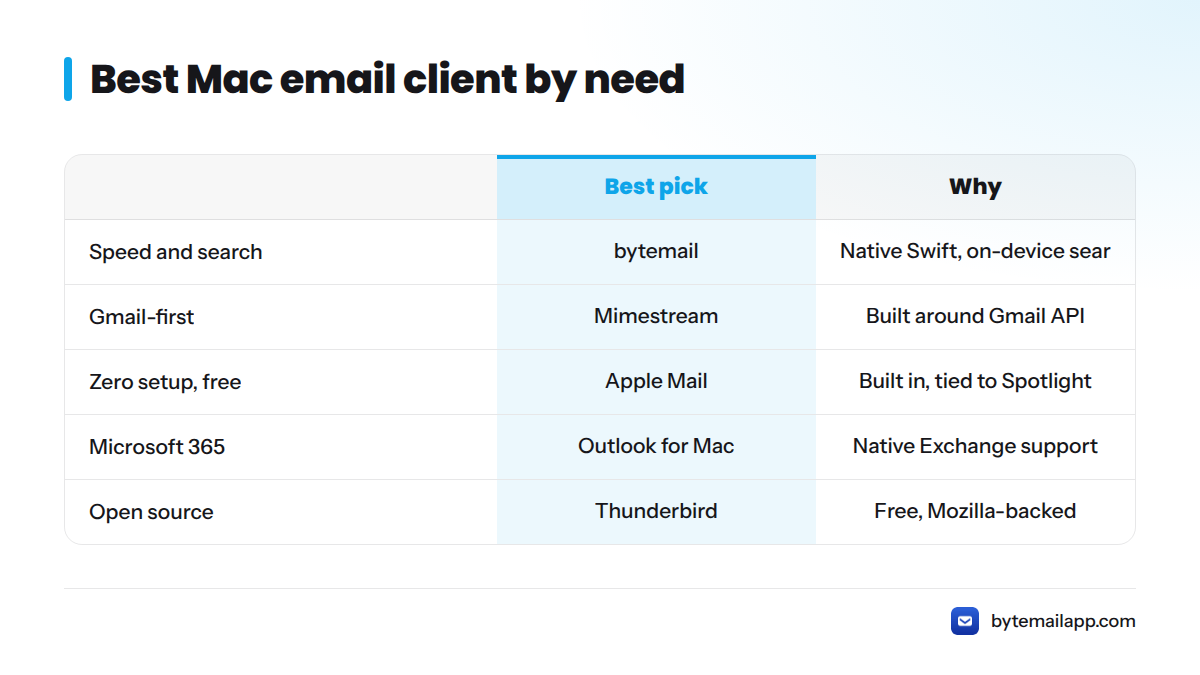
| Best for | Client | One-line reason |
|---|---|---|
| Speed and cross-account search on Apple silicon | bytemail | Native Swift app, no bundled browser engine, on-device search |
| Gmail-first users | Mimestream | Built around the Gmail API |
| Apple ecosystem simplicity | Apple Mail | Free, built in, tied into Spotlight |
| Microsoft 365 and Exchange | Outlook for Mac | Native home for Exchange mail and calendar |
| Power users and keyboard workflows | Spark or Airmail | Deep triage and shortcut tooling |
| Open-source option | Thunderbird | Free, community-maintained, Mozilla-backed |
| Many providers in one app | eM Client | Wide provider list and a mature desktop feature set |
Quick answers by situation:
- Want the fastest email client Mac users can run daily? Start with bytemail.
- Want zero setup and zero cost? Stay with Apple Mail.
- Live in Gmail? Try Mimestream.
- Run on Exchange? Use Outlook.
- Want open-source? Pick Thunderbird.
How we ranked Mac email clients: the scoring rubric
Most roundups rank by feature lists. We rank by how the app is built, because the build shapes launch time, scrolling, battery life, and the route your mail takes. Five criteria carry the score.
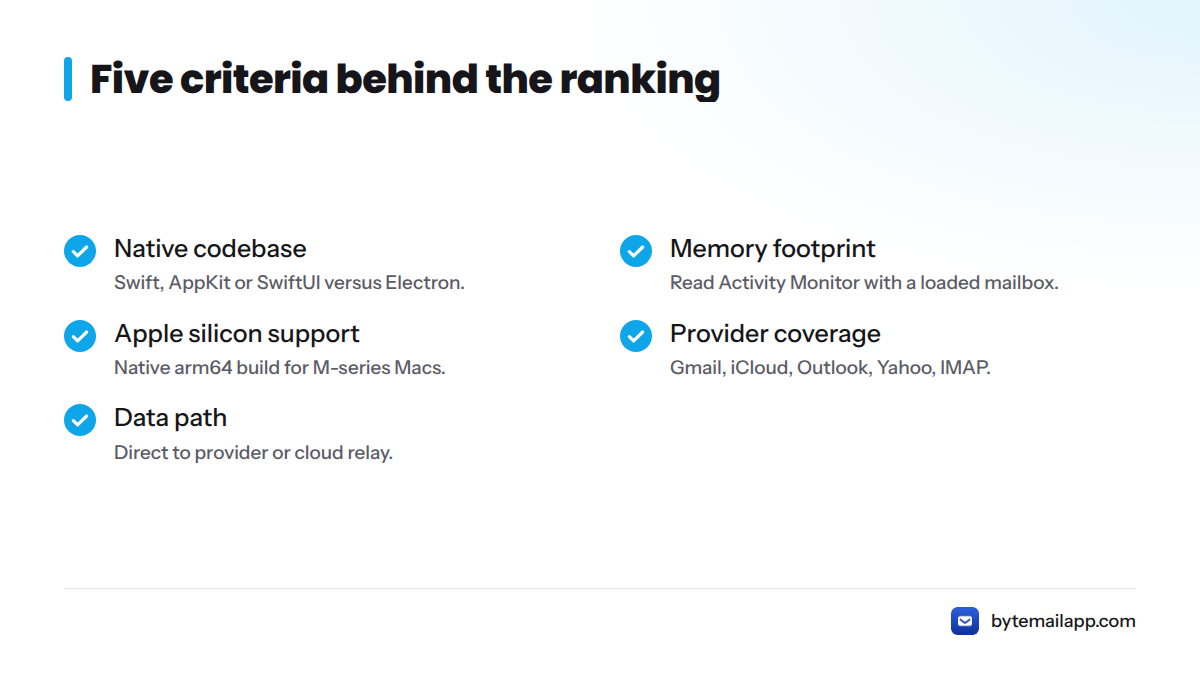
| Criterion | What we check | Why it matters |
|---|---|---|
| Native codebase | Swift/AppKit/SwiftUI vs Electron | Launch, scrolling, memory |
| Memory footprint | Activity Monitor with a loaded mailbox | Battery and multitasking |
| Apple silicon support | Native arm64 build | Speed on M-series Macs |
| Provider coverage | Gmail, iCloud, Outlook, Yahoo, IMAP | Whether one app covers every account |
| Data path | Direct to provider vs cloud relay | Who touches your mail in transit |
Disclosure: bytemail publishes this page and ranks itself first. We limit bytemail claims to criteria we built and measured, and we cite vendor pages for every competitor claim. We checked facts about other apps against vendor pages in 2026. If you spot an error, tell us through the bytemail FAQ page.
Native codebase (Swift/AppKit vs Electron)
A native Mac email client is written in Apple's own frameworks, such as Swift with AppKit or SwiftUI, so it uses the same system components as Finder and Apple Mail. An Electron app bundles a Chromium browser engine and runs a web app inside it. That bundle is why Electron apps often launch slower and hold more memory. Our page on what makes a native Mac email client faster goes further.
Memory footprint
Open Activity Monitor with a real mailbox loaded and read the memory column after an hour of use. We do not publish competitor memory numbers, because we have no sourced figures for them. Check your own machine. It takes two minutes.
Apple silicon support
Apple silicon means the M-series chips Apple has shipped in Macs since 2020. A native arm64 build runs without translation, which helps speed and battery. Our note on a lightweight email client optimised for Apple silicon covers what to look for.
Provider coverage (Gmail, iCloud, Outlook, Yahoo, IMAP)
Almost every provider speaks IMAP, the standard defined in RFC 9051 from the IETF. Gmail and Microsoft 365 also offer richer APIs or sign-in flows, and a good client handles both. Gmail users can read about the Gmail app for Mac approach, and Yahoo users about the Yahoo Mail app for Mac.
Data path (no-relay vs cloud relay)
A no-relay client talks straight from your Mac to your mail provider. A cloud relay client routes mail through the vendor's servers first, which puts a third party in the middle. Neither is wrong, but you should know which one you are choosing. Here is how a no-relay client keeps mail private. For competitors, read each vendor's privacy policy before you decide.
How we tested
We test on Apple silicon Macs running a current macOS release with a large, multi-account mailbox, and we time in-app search across all accounts in milliseconds. bytemail's measured search results are published first-party. We print no competitor timings, because we have no sourced numbers for them. Run the same search in two apps on your own mailbox and trust what you see.
1. bytemail: best for speed and cross-account search on Apple silicon
Verdict: bytemail is a native Mac client built for people who open email all day and hate waiting.
It is written in Swift with SwiftUI and AppKit, ships no bundled browser engine, and requires macOS 14 or later. IMAP IDLE handles push delivery. Search stays on your device, so it works offline. Credentials live in the macOS Keychain, and the app sends no telemetry. Mail goes straight to your provider. Details sit on the native macOS email app page.
As of this writing, bytemail had not yet launched and was collecting waitlist sign-ups ahead of an imminent release.
Pros
- Native codebase and native Apple silicon build
- On-device search that keeps working offline
- Direct-to-provider data path, with credentials in Keychain
- Works with Gmail, iCloud, Outlook, Yahoo, and standard IMAP
- A unified inbox for combining Gmail, iCloud and Outlook in one inbox
Cons
- Mac only, and macOS 14 or later
- Newer than long-established clients, so it has a shorter track record
Who it's for
Anyone with several accounts and a big mailbox who wants quick search and a light footprint. Skip it if you need Windows or Linux, or an older Mac that cannot run macOS 14. See bytemail pricing for plans, including a lifetime licence option.
2. Best for Gmail-first users: Mimestream
Verdict: Mimestream is a native Mac app built specifically around Gmail, and a strong pick if you want the best email client for Mac Gmail workflows.
It talks to Gmail through Google's API rather than plain IMAP, which gives it tight label and thread handling. Plans change, so check the vendor's pricing page for current terms. We quote no prices here.
- Pros: native feel, Gmail-aware features
- Cons: Gmail and Google Workspace focus, so it suits one provider family best
- Skip it if: your mail lives across iCloud, Outlook, and Yahoo
Looking at other choices? Read our list of Mimestream alternatives.
3. Best for Apple ecosystem simplicity: Apple Mail
Verdict: Apple Mail is free, preinstalled, and syncs smoothly with iCloud. That makes it the right starting point for most new Mac owners and the best email client for Mac free of charge.
Apple's own documentation covers adding accounts from iCloud, Gmail, Exchange, Yahoo, and others, and Mail results show up in Spotlight. If you want one app on your Mac and iPhone with no setup, it is hard to beat on cost.
- Pros: free, built in, Apple ecosystem fit
- Cons: limited triage tools, and in our experience search can feel slow on very large mailboxes
- Skip it if: you juggle many accounts and want faster search or a lighter workflow
Is there a better email client than Apple Mail? Yes for specific needs, and no for plain, free simplicity. If you want a best Mac mail alternative, our page on webmail client alternatives shows why a native app beats a browser tab.
4. Best for Microsoft 365 and Exchange: Outlook for Mac
Verdict: Outlook for Mac is the natural choice when your company runs Microsoft 365 or Exchange.
Microsoft's support site lists system requirements and features, including mail, calendar, and contacts in one app. Check those requirements before installing, because they track recent macOS versions. For lighter Outlook.com or Microsoft 365 mailbox access in a native client, see our Outlook email client for Mac page.
- Pros: deep Exchange support, calendar built in
- Cons: heavier than simpler clients, and some features sit behind a Microsoft subscription
- Skip it if: you only want fast mail and do not use Exchange
5. Best for power users and keyboard-driven workflows: Spark or Airmail
Verdict: Both Spark and Airmail lean into triage, shortcuts, and customization.
Pick Spark if you want team features and a smart inbox. Pick Airmail if you want a wide provider list and custom actions. Both vendors change plans over time, so confirm current pricing and data handling on each site and privacy policy.
- Pros: strong shortcut and triage tooling
- Cons: more settings to learn, and each privacy policy deserves a read to understand the data path
- Skip it if: you want a quiet, minimal inbox
Compare more options in our guides to Spark alternatives and Airmail alternatives. For shortcut habits, our post on Gmail shortcuts vs Mac shortcuts helps.
6. Best open-source option: Thunderbird
Verdict: Thunderbird is a free, open-source client from the Mozilla community, and it runs on Mac, Windows, and Linux.
It handles IMAP, POP3, and multiple accounts. Its public source matters if you like inspecting your tools. It looks more traditional than newer Mac apps.
- Pros: free, open-source, cross-platform
- Cons: a less Mac-native feel
- Skip it if: you want a polished, Mac-first interface
See our list of Thunderbird alternatives if it feels dated.
7. Best for multi-provider coverage: eM Client
Verdict: eM Client pairs a long provider list with mail, calendar, and contacts in one desktop app.
Check the vendor site for current pricing, free-tier limits, and supported providers before you commit. If Canary Mail interests you instead, our Canary Mail alternatives guide covers it. Our page on multiple email accounts on Mac shows how bytemail handles the same job.
- Pros: broad provider support, full desktop feature set
- Cons: not built on Apple's native frameworks to the degree bytemail is, per the rubric above
- Skip it if: you only have one or two simple accounts
Ready to compare against your current app? Try bytemail and run the same search in both.
How to choose the right Mac email client for you
Next steps: run this five-part check.
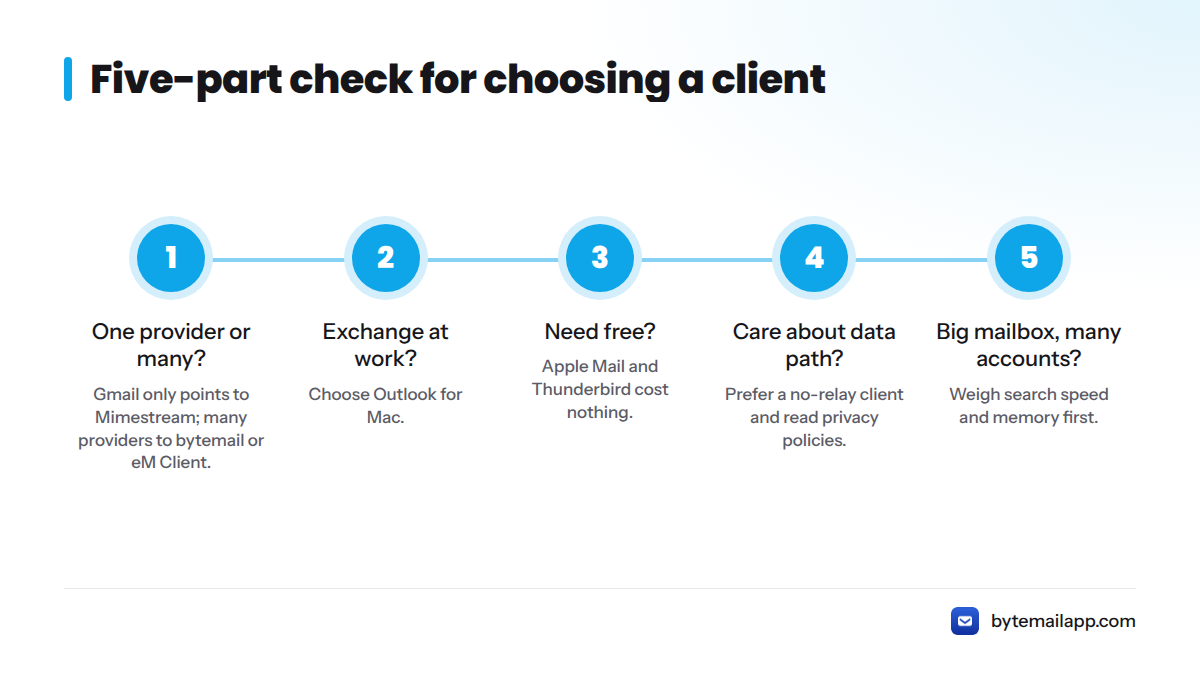
- One provider or many? Gmail only points to Mimestream. Many providers point to bytemail or eM Client.
- Exchange at work? Choose Outlook for Mac.
- Need free? Apple Mail and Thunderbird cost nothing. Our blog covers more free Mac email clients.
- Care about data path? Prefer a no-relay client, and read vendor privacy policies.
- Big mailbox, many accounts? Weigh search speed and memory first.
Do you need a paid email client?
No. Apple Mail and Thunderbird are free and work well. Pay when a paid app saves you time every day, through faster search, better triage, or a cleaner multi-account setup. Compare plans on the bytemail pricing page.
Switching from Apple Mail without losing mail
Your mail lives on your provider's server, not inside Apple Mail. Add the same accounts to the new app over IMAP, let it re-sync, and keep Apple Mail until you are happy. For local "On My Mac" folders, export them from Apple Mail first.
Frequently asked questions
What's the fastest email client for Mac?
Speed depends on build and mailbox size. Native apps with on-device search, like bytemail, tend to launch and search quickly because they carry no bundled browser engine. Test search across your own accounts to confirm.
Is there a good email client for Mac that supports Gmail, iCloud and Outlook together?
Yes. bytemail, Apple Mail, Airmail, Spark, and eM Client all support several providers. bytemail combines them in a single unified inbox with direct-to-provider connections.
Is Apple Mail the best option?
It is the best free, zero-setup option, but not the best for everyone. If you want faster search, deeper multi-account handling, or a lighter footprint, a third-party client may fit better.
Do I need a paid email client?
Not necessarily. Free clients cover the basics. A paid client earns its price when it saves daily time or fits a workflow Apple Mail cannot.
Ready to try it? Try bytemail, or see bytemail pricing first.