Outlook Email Client for Mac: Native & Fast
bytemail is a fast, native Outlook email client for Mac. We built it in Swift with SwiftUI and AppKit, and it bundles no browser engine. After an OAuth sign-in, your Mac talks straight to Microsoft's servers. Your Outlook.com and Hotmail mail lands in a real Mac app, not a browser tab.
bytemail is not live yet. We are collecting waitlist sign-ups, so you can join the waitlist and get in line early.
A Native Outlook Email Client for Mac, Not a Browser Wrapper
A native macOS email client is written for the Mac's own toolkit. It uses system windows, menus, notifications and shortcuts. Outlook on the web works the other way around. It is a website that lives in a browser tab, and it cannot serve as your Mac's default mail handler, as a Microsoft Q&A thread on the topic shows.
Plenty of "desktop" mail apps are web pages in disguise, shipped with a bundled browser engine. bytemail skips that layer. In my testing the app launches quickly and scrolls smoothly, and the reason is simple: nothing sits between your inbox and the Mac's own drawing code. If you want the longer argument, our page on what makes bytemail a true native macOS email app lays it out. The full native vs Electron comparison has its own page.
Who This Outlook.com Email Client for Mac Is For
This page fits you if any of these sound familiar:
- You have a personal Outlook.com or Hotmail address and read it in a browser tab.
- You juggle several accounts and want them in one window.
- You want an app that feels like it belongs on a Mac.
- You are shopping for an Outlook Mac app alternative that connects to your existing account.
Microsoft 365 work and school accounts are a different case, and they have their own page.
How Outlook.com Sign-In Works in bytemail
We tested the Outlook.com sign-in ourselves. Here is what we saw.
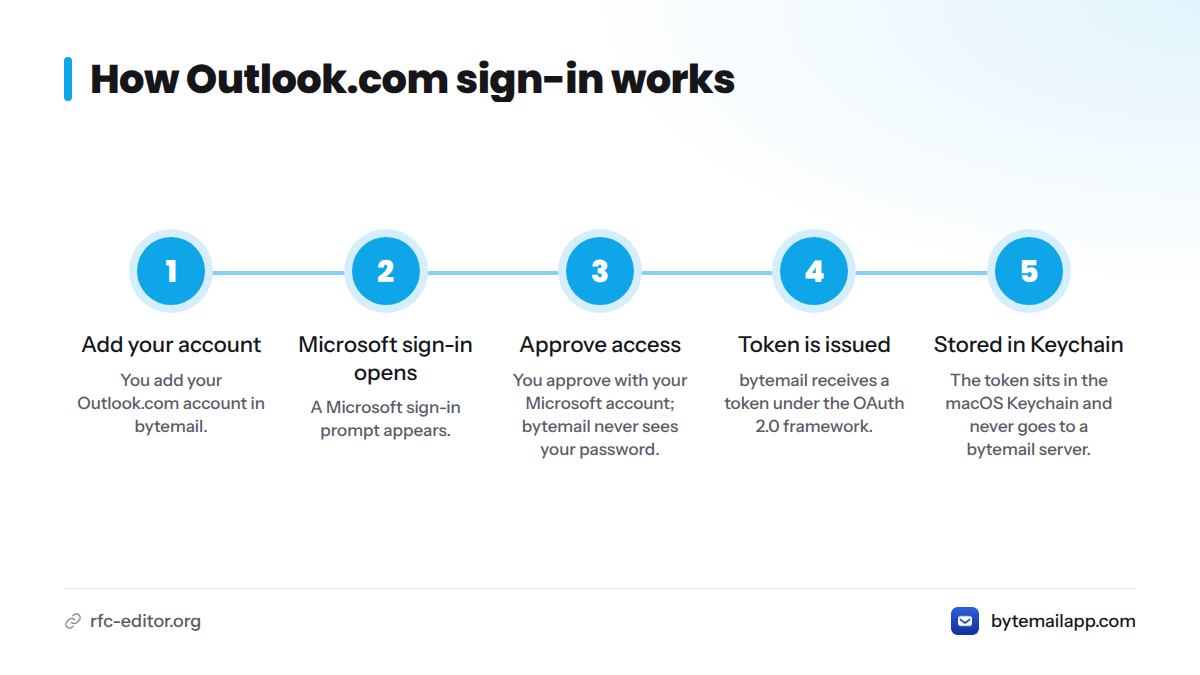
Sign in with Microsoft's OAuth flow
You add your Outlook.com account, and a Microsoft sign-in prompt opens. You approve access with your Microsoft account. bytemail never sees your password. It receives a token instead, issued under the OAuth 2.0 framework defined in RFC 6749.
Where your credentials live
The token sits in the macOS Keychain), Apple's built-in credential store. It never goes to a bytemail server. For a side-by-side look at OAuth versus app password sign-in, see that dedicated comparison.
Engineering note: An engineer with hands-on OAuth and IMAP experience built and checked the sign-in. What we describe here is what we observed in testing. It is not a promise that every account behaves identically.
A Direct Connection to Microsoft, With No bytemail Server in Between
Picture the path: your Mac, then an OAuth handshake with Microsoft, then Microsoft's servers. That is the whole diagram. bytemail runs no relay and no intermediary server.
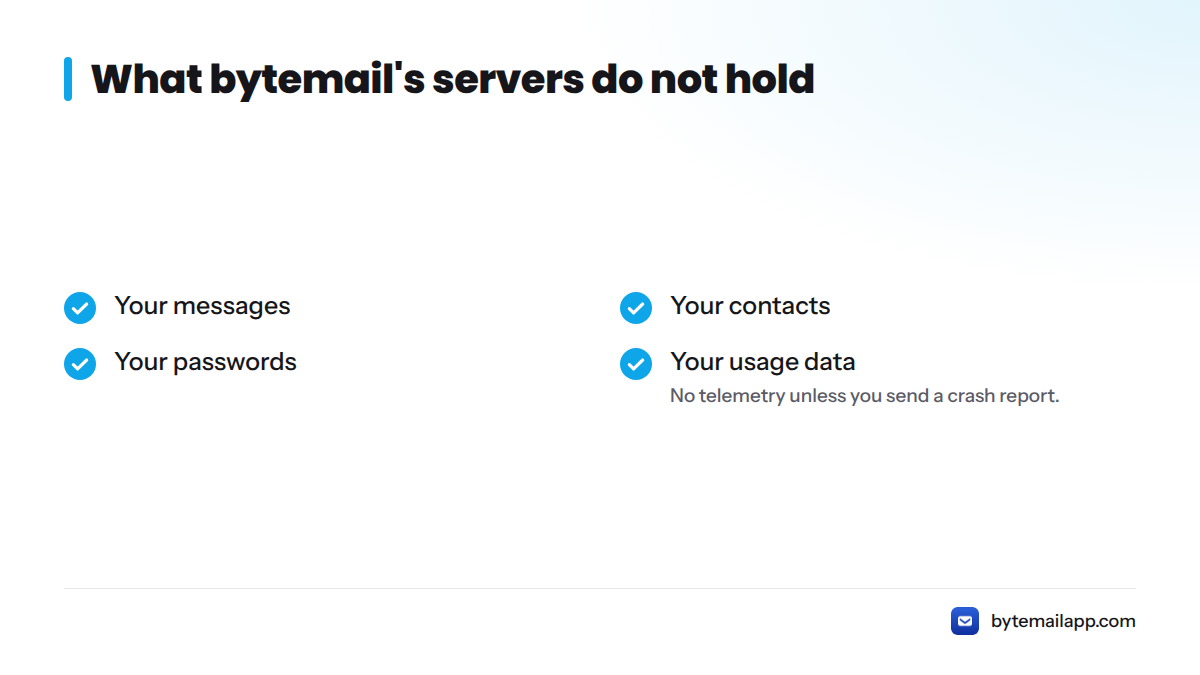
The consequence is easy to state. bytemail's servers do not hold:
- Your messages
- Your contacts
- Your passwords
- Your usage data
There is no telemetry either, unless you choose to send a crash report. This is privacy by architecture. We cannot leak what we never receive. For more detail, read how a privacy-focused Mac email client works.
What You Get From an Outlook IMAP Mac Client Built for macOS
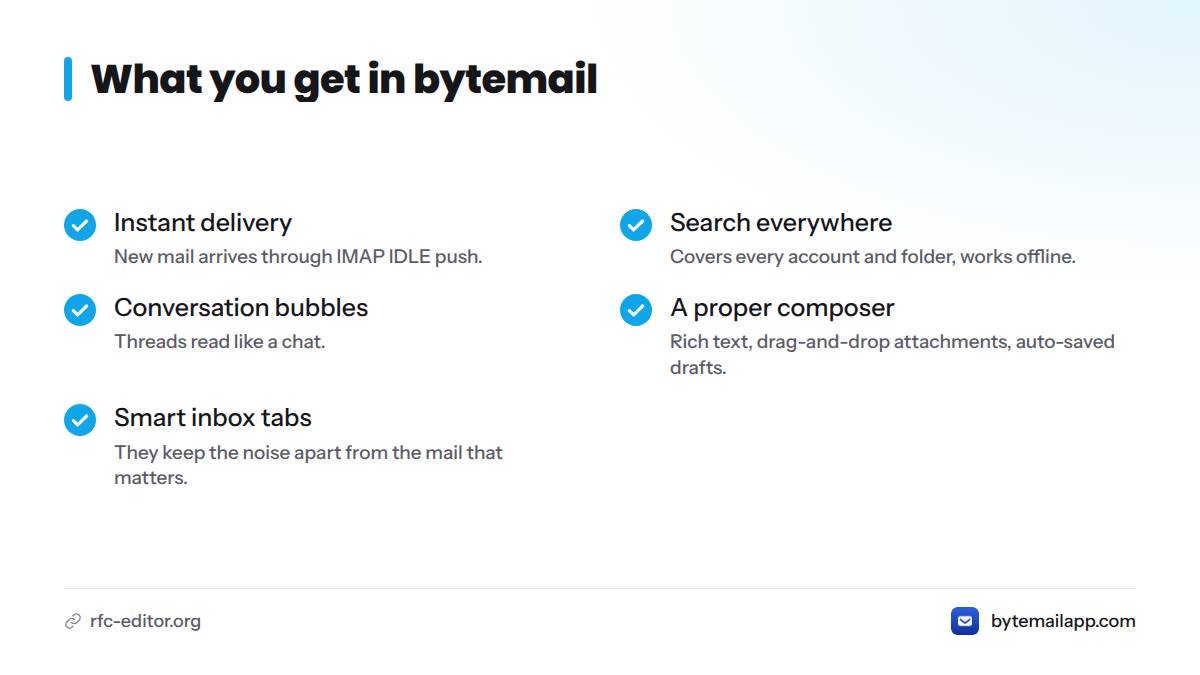
- Instant delivery: new mail arrives through IMAP IDLE push, the mechanism described in RFC 2177, with native notifications and a Dock badge.
- Search everywhere: one search covers every account and folder. It runs on your Mac and works offline.
- Conversation bubbles: threads read like a chat.
- A proper composer: rich text, drag-and-drop attachments and auto-saved drafts.
- Smart inbox tabs: they keep the noise apart from the mail that matters.
- Sender pictures and colour-coded account avatars: you always know which account you are in.
Here is how it compares with the browser version:
| Outlook on the web | bytemail | |
|---|---|---|
| Where it runs | A browser tab | A native Mac app |
| How it connects | A web session | A direct connection to Microsoft |
| Search | Needs a connection | On-device, works offline |
| Other accounts | Separate tabs | One window |
Requirements: macOS 14 or later, optimised for Apple silicon. See how that plays out on M-series Macs.
Gmail and Outlook in one app
Add your Gmail next to Outlook.com and read both in a single unified inbox. iCloud, Yahoo and other IMAP accounts work too. Our guide to multiple email accounts on Mac covers the details, and the Gmail and Outlook together page goes deeper on that pairing.
What This Page Leaves Out
To keep this page focused, three topics live elsewhere:
- Microsoft 365 work mail on Mac: work and school accounts have their own page.
- Adding an Outlook account in a Mac email app: the step-by-step setup guide covers it.
- OAuth versus app password sign-in: the full comparison of the two methods.
You can also browse all supported mail providers.
Try bytemail With Your Outlook.com Account
If sync glitches and accounts that refuse to connect have worn you down, a direct, native connection is worth a look. I would rather you judge it on your own inbox than on a feature list.
bytemail is waitlist-only for now. Join the waitlist for early access. Then check bytemail pricing for the monthly, yearly and lifetime options. Questions about requirements or providers? The bytemail FAQ has answers. Once bytemail launches, the Outlook email client Mac download will go to waitlist members first.
FAQ
Does bytemail support Outlook.com and Hotmail accounts?
Yes. bytemail reads personal Outlook.com and Hotmail mail, so it works as a Hotmail on Mac native app. You sign in with your Microsoft account through OAuth, and your mail connects directly to Microsoft's servers.
How is bytemail different from the Outlook app for Mac?
bytemail is a native app built around a fast, direct connection with no bytemail server in between. It keeps tokens in the macOS Keychain, searches on your Mac, and puts Outlook.com, Gmail and other accounts in one inbox. It does not target Microsoft 365 work or school accounts.
Can I use Outlook and Gmail together in bytemail?
Yes. Add both accounts and read them in one unified inbox. Colour-coded avatars show which account each message belongs to.