IMAP Email Client for Mac: Any Server, No Relay
bytemail is an IMAP email client for Mac that connects straight to your mail server. No bytemail relay sits in the path, and your credentials stay in the macOS Keychain. Point it at a custom domain, Fastmail, Zoho Mail or a self-hosted box, and it talks directly to your mail host. Download bytemail or read the setup overview below.
Full disclosure: this is bytemail's own page, so treat the claims as a vendor's claims. Check them against the connection list further down.
Which Mac Email Client Connects Directly to Any IMAP and SMTP Server?
bytemail does. It is a native IMAP client for macOS that opens its own connections from your Mac to the incoming (IMAP) and outgoing (SMTP) servers your host gives you. Mail never passes through a bytemail server on the way.
Two quick definitions help. IMAP, specified in RFC 9051, lets a client read and manage mail that stays stored on the server. SMTP, specified in RFC 5321, is how a client hands outgoing mail to a server. Together they form the open standards that ordinary mail hosts speak, which is why an IMAP SMTP Mac app can work with so many providers.
Most "best Mac email client" roundups, such as the one from Zapier, rank apps by general polish and treat IMAP as a footnote. If your mail lives on a custom domain or a smaller host, that ordering is backwards. Server support should be your first filter, not your last.
What "No Relay" Means: bytemail Connects Straight to Your Mail Host
Let's break it down.
Direct Connection vs Vendor Relay
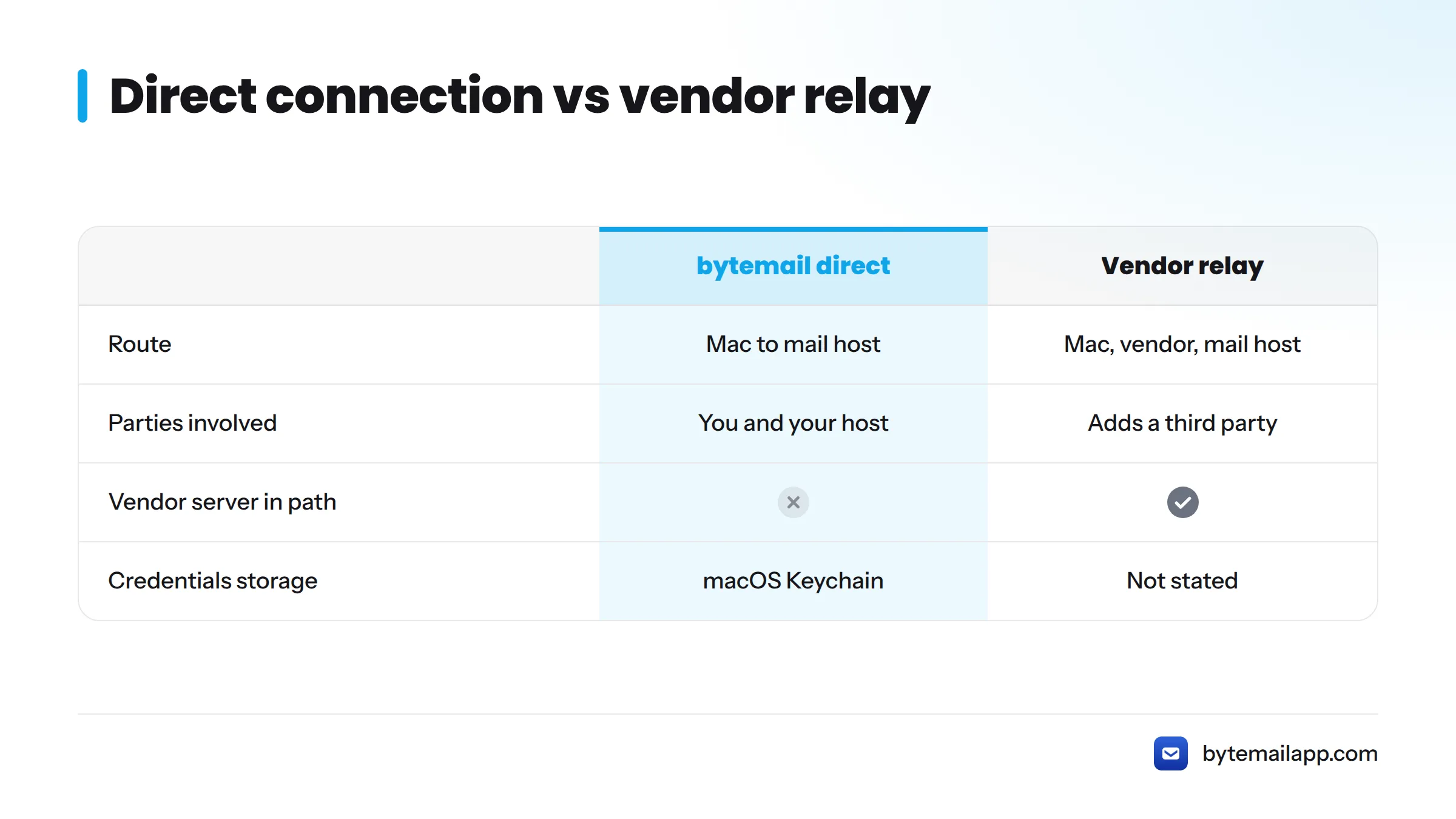
A vendor relay is a server run by the app maker that sits between your email app and your mail host. The app talks to the vendor, and the vendor talks to your host. A direct connection removes that middle step.
| Path | Route |
|---|---|
| Direct (bytemail) | Your Mac to your mail host |
| Vendor relay | Your Mac to the vendor's server to your mail host |
A relay gives a third party the chance to see or store your mail and metadata in transit. A direct connection leaves only two parties: you and your host. I prefer the second model for one reason. There is less to trust. That is what a Mac email client with no relay means in practice.
Where Your Credentials Live
bytemail stores your account credentials in the macOS Keychain, Apple's built-in secure store for passwords. They never reach bytemail servers, because bytemail has no relay to send them to. Apple documents how the Keychain works in Apple Platform Security.
No bytemail server in the path. Your Mac connects to your mail host. That is the whole architecture.
For the longer story, see how a privacy-by-architecture email client works.
What a Custom IMAP Server Gets You on Mac
Here is what works with a generic IMAP and SMTP account in bytemail:
| Capability | Works with generic IMAP/SMTP | Notes |
|---|---|---|
| Multiple IMAP accounts | Yes | Add as many accounts as you need |
| Unified inbox | Yes | Mix IMAP accounts with other providers in one window |
| IMAP IDLE push | Yes | Push where your server supports IDLE |
| Native notifications and Dock badge | Yes | Standard macOS behaviour |
| Cross-account search | Yes | Runs on your Mac |
| Offline search | Yes | Works on mail already synced |
| SSL/TLS | Yes | Encrypted connections to your host |
Two practical notes. Some hosts require an app-specific password instead of your main password, and some providers require OAuth. bytemail asks for whatever your host requires. Also, TLS for mail access and submission is the modern default, as RFC 8314 lays out.
Want the one-inbox view in more depth? Read about the unified inbox for Mac and managing multiple email accounts on a Mac. Running several mailboxes is the everyday case for multiple IMAP accounts on a Mac.
How to Connect an IMAP Account to a Mac Email App
This is an overview, not a tutorial. The full walkthrough lives in the setup guide, "set up any IMAP account on a Mac email app."
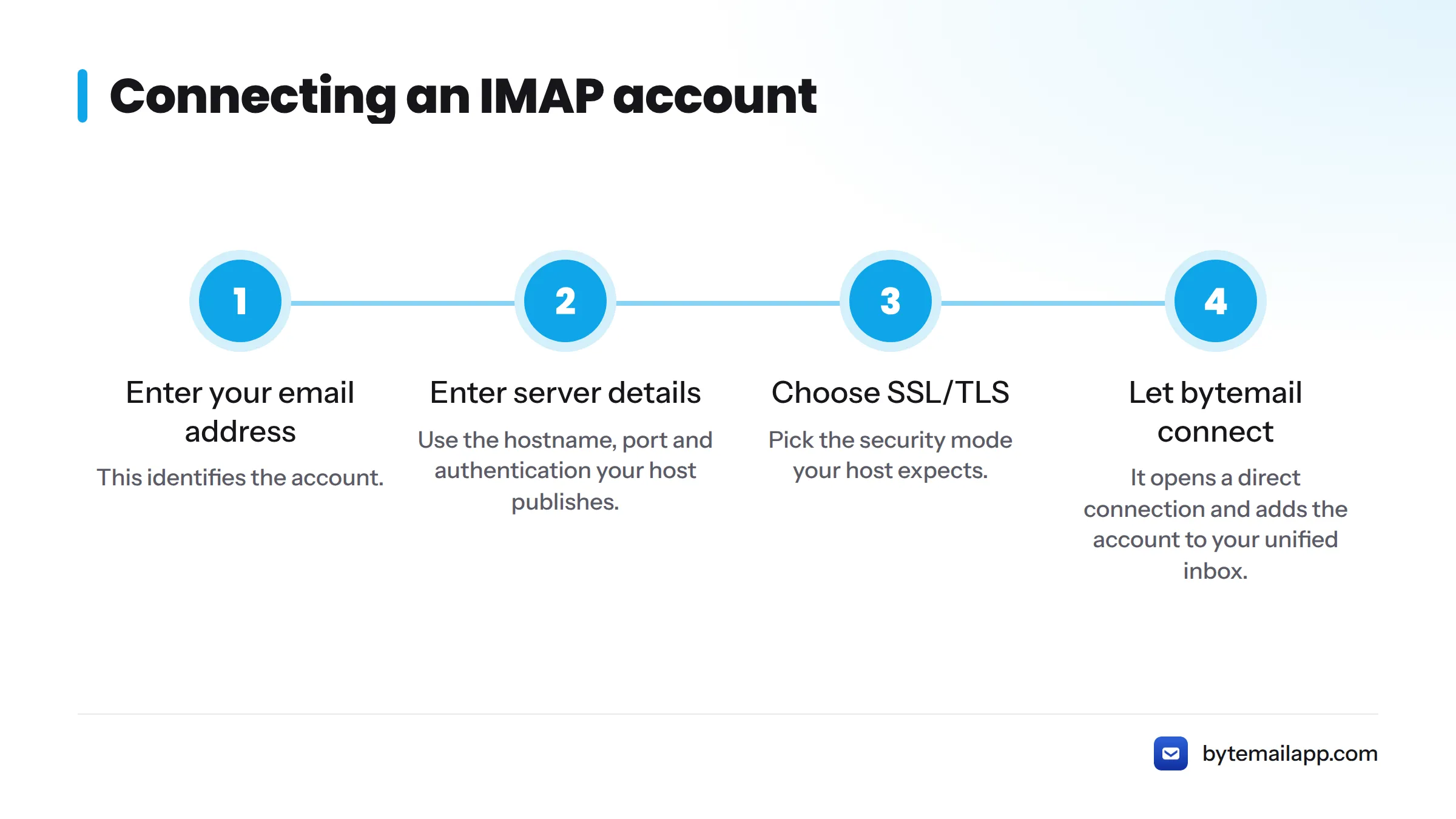
- Enter your email address. This identifies the account.
- Enter the server hostname, port and authentication. Use the values your host publishes. Add an app-specific password if your host requires one.
- Choose SSL/TLS. Pick the security mode your host expects.
- Let bytemail connect. It opens a direct connection and adds the account to your unified inbox.
If a connection fails, the guide on fixing an IMAP connection that fails on Mac covers it. Our FAQ also lists requirements and supported providers.
Every Network Connection bytemail Makes
Claims are cheap, so bytemail publishes a list of every network connection the app makes. Here is the summary:
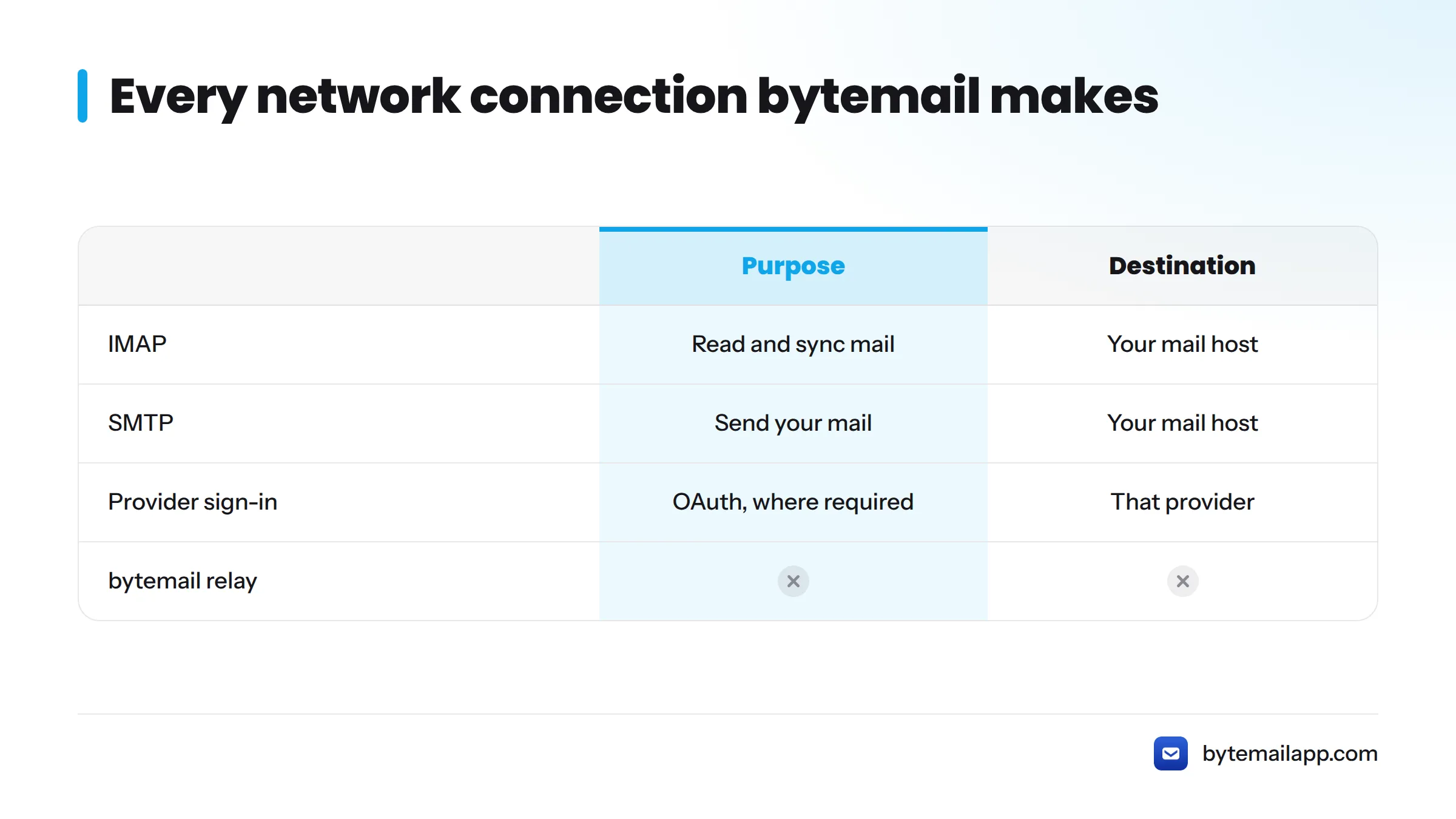
| Connection | Purpose | Destination |
|---|---|---|
| IMAP | Read and sync your mail | Your mail host |
| SMTP | Send your mail | Your mail host |
| Provider sign-in (where required) | Authenticate with providers that use OAuth | That provider |
There is no connection to a bytemail relay. If you opt into a crash report, you can read it before anything is sent. Check the details on the privacy page and follow ongoing maintenance in the changelog.
Who This Native IMAP Client Fits, and Who Should Look Elsewhere
It fits you if you:
- Run a self-hosted server or a custom-domain mailbox
- Use Fastmail, Zoho Mail or hosting-provider mail
- Juggle several accounts and want one native Mac email app
- Want an app that runs natively on Apple silicon
- Care about where your mail travels
Look elsewhere if you:
- Need a client for Windows, Linux or a non-macOS system. bytemail is Mac only.
- Run a macOS version earlier than 14. bytemail needs macOS 14 or later.
- Want features tied to one provider. For those, see the provider-specific integrations for Outlook, iCloud and Yahoo, or the Gmail-specific Gmail app for Mac.
Comparing options? The best Mac email client roundup and the Apple Mail alternatives guide show how bytemail stacks up against Apple Mail and Thunderbird.
Next Steps: Try bytemail With Your IMAP Account
Ready to test it on your own server? Get bytemail, add your IMAP account, and watch it connect straight to your host. If you are searching for an IMAP email client for Mac free to try or one to download, check bytemail pricing for plan details.
FAQ
Does bytemail work with any IMAP server?
It works with any standard IMAP and SMTP server, including custom domains, Fastmail, Zoho Mail and self-hosted setups. You enter the hostname, port, authentication and security mode your host provides.
Does bytemail store my IMAP password on its servers?
No. Credentials stay in the macOS Keychain on your Mac. With no relay server in the path, your password goes only to your mail host.
Can I mix IMAP accounts with Gmail and iCloud?
Yes. IMAP accounts sit alongside Gmail, iCloud and other providers in one unified inbox, with search across all of them.
What macOS version do I need?
bytemail requires macOS 14 or later and runs natively on Apple silicon.